Embedding of your choice
Stylo.jsp directly as a view, StyloFrame as the classic frame integration or StyloFrameNG as a lean embedding with WebDAV proxy – whatever suits your interface.

Stylo runs in the browser and can be embedded in ad systems and self-service portals – via documented interfaces, as a Docker image and multi-tenant. We’re happy to support you with the integration.
Stylo is a self-contained web application: the editor runs in the browser, while the server stores and processes the documents. You embed the editor as a view in your interface – directly, as StyloFrame or as the lean StyloFrameNG. Two interfaces connect both sides: via postMessage your system controls the editor, via StyloCallback Stylo asks your system and reports back. In the background, the ServerRenderer handles everything that doesn’t need anyone to open the editor.
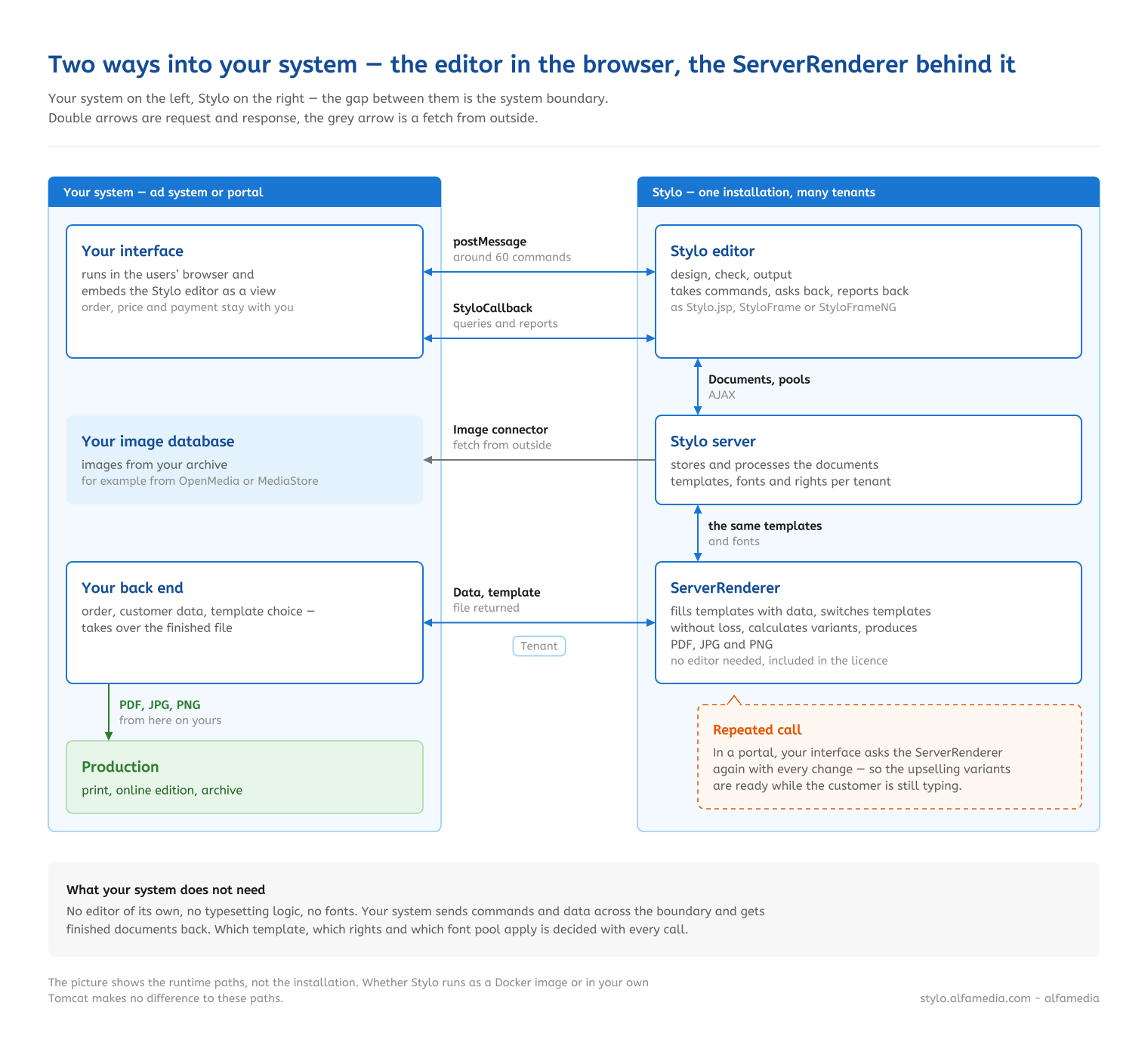
The interfaces cover the whole journey – from filling the template to the finished file.
Stylo.jsp directly as a view, StyloFrame as the classic frame integration or StyloFrameNG as a lean embedding with WebDAV proxy – whatever suits your interface.
Via the JavaScript interface StyloCallback, Stylo asks your system – for example for rights, colours, blocklist, pools or ad number – and reports changes, texts, PDF and preview back.
Read, set and update text flows and user fields, query statistics, and show or hide fields. This way your system takes data from the order straight into the ad.
Import images, backgrounds and decorative elements, set colours, lines and corners, change the height and width of the ad, transform documents.
Trigger saving, check for changes, create PDFs, print and choose preview formats – without anyone pressing a button in the editor.
Set rights and the font pool per call, show notifications, undock the editor into a separate window or close the document. Your system decides what happens when.
The Stylo ServerRenderer works in the background: it creates Stylo documents, fills templates with data, switches between templates without losing text or images, and produces PDF, JPG or PNG. In the alfa Webstore it shows designed variants of the ad for upselling while the customer is still typing. The ServerRenderer is included in the licence.

Stylo is available as a Docker image with all components. If you prefer, it also runs as a classic web application in Tomcat.
One installation serves several tenants, each with its own settings, rights and fonts. Access, administration and configuration use separate keys per tenant.
Image connectors such as OpenMedia and MediaStore give Stylo access to your image databases; external image, background and decoration pools can be connected too.
The Stylo Toolbox also offers its checks as an interface – for example to check templates automatically for overset text, missing fonts and image resolution.
We’ll show you how Stylo fits into your ad system or portal and support you in connecting it.
Prefer to talk right away? Call us on +49 6074 3104-0 or email info@alfamedia.com.